The digital heart of your Mac – its operating system – is constantly evolving. But keeping pace with those changes can be tricky. Each year, Apple unveils a new macOS version, brimming with features and improvements. However, not every Mac is invited to the party. Understanding compatibility is crucial to unlocking the full potential of your machine and ensuring its continued security.
Currently, the latest macOS is Tahoe (version 26.1), released in November 2025. This powerful update runs flawlessly on all Macs powered by Apple’s M-series chips, and extends support to many Intel-based Macs from 2019 onward. But the landscape is shifting. Older machines are gradually left behind, unable to experience the newest innovations.
Don’t assume an upgrade is always the best path. While tempting, installing an unsupported macOS version can lead to instability and performance issues. Apple prioritizes security, and actively maintains only a select number of recent versions. As of November 2025, macOS Sequoia (15), Sonoma (14), and Ventura (13) remain actively supported with critical security updates – safeguarding your data and privacy.

Let’s dive into the specifics. macOS 26 Tahoe boasts compatibility with these models:
M-series Macs:MacBook Pro (M1 and later), MacBook Air (M1 and later), iMac (M1 and later), Mac mini (M1 and later), Mac Studio (M1 and later), Mac Pro (M1 and later).
Intel Macs:MacBook Pro (Intel, 13‑inch, 2020, Four Thunderbolt 3 ports), MacBook Pro (Intel, 16‑inch, 2019), Mac Pro (Intel, 2019), iMac (Intel, mid 2020).
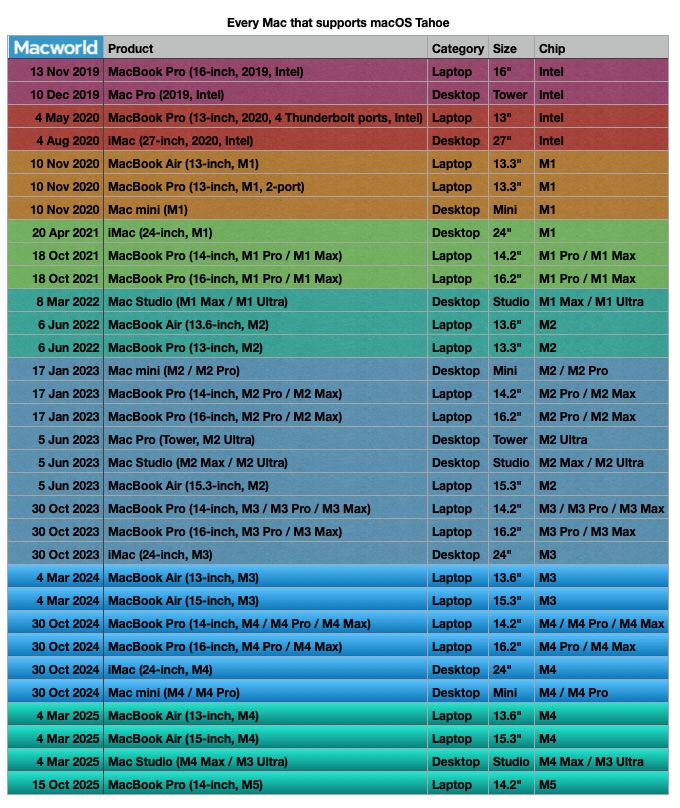
However, some Macs are simply not equipped to handle Tahoe. These include iMacs (Intel, 2019), iMac Pro (Intel, 2017), Mac mini (Intel, 2018), and MacBook Pro (Intel, 2018). These machines will need to remain on an older, supported operating system.
Looking back, macOS 15 Sequoia, released in September 2024, continues to receive security updates. It runs on all M-series Macs and the following Intel models: iMac (Intel, 2019 and August 2020), Mac Pro (Intel, 2019), iMac Pro (Intel, 2017), MacBook Air (Intel, March 2020), Mac mini (Intel, 2018), and MacBook Pro (Intel, 2018, 2019 and May 2020).
macOS 14 Sonoma, launched in September 2023, also remains secure with ongoing updates. Compatible Macs include iMacs from 2019, Mac Pros from 2019, iMac Pros from 2017, Mac Studios from 2022, MacBook Airs from 2018, Mac minis from 2018, and MacBook Pros from 2018.
Ventura (macOS 13), released in October 2022, still receives security patches and supports MacBook models from 2017, MacBook Airs from 2018, MacBook Pros from 2017, Mac minis from 2018, iMacs from 2017, iMac Pros, and Mac Pros from 2019, and Mac Studios.
Monterey (macOS 12), available since October 2021, runs on a broad range of Macs, including those from 2014 and later, but no longer receives security updates. Big Sur (macOS 11), released in November 2020, also lacks current security support.
As you venture further back in time, compatibility narrows. Catalina (macOS 10.15), Mojave (macOS 10.14), High Sierra (macOS 10.13), Sierra (macOS 10.12), El Capitan (macOS 10.11), Yosemite (macOS 10.10), Mavericks (macOS 10.9), and Mountain Lion (macOS 10.8) all have diminishing support and potential security vulnerabilities.
A crucial point for owners of M-series Macs: you cannot downgrade to an operating system older than Big Sur. The fundamental architecture of Apple Silicon prevents compatibility with earlier macOS versions. Understanding these limitations is key to maintaining a secure and optimized Mac experience.
Ultimately, choosing the right macOS version is a balance between accessing the latest features and ensuring continued security and stability. Knowing your Mac’s capabilities and Apple’s support policies empowers you to make the best decision for your digital life.