
Many modern displays conceal a surprising power: integrated USB hubs. These aren't simply extra ports; they're gateways to streamlined connectivity, capable of blazing-fast data transfer and reliable power delivery.
Often utilizing USB 3.0 or the even faster USB 3.2 standards, these ports can achieve speeds of up to 5 or 10 gigabits per second. This unlocks the full potential of external solid-state drives and high-performance peripherals, dramatically reducing transfer times.
Despite this capability, these valuable ports frequently go unused. Integrating them into your setup can yield significant improvements in both technical performance and overall workspace ergonomics.
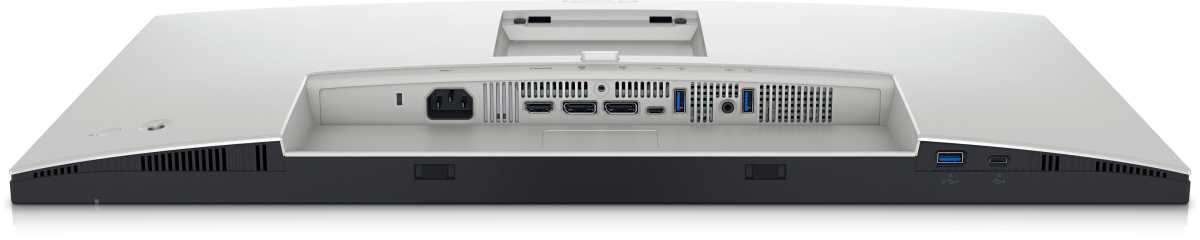
Imagine a workspace with drastically reduced cable clutter. By centralizing connections through your monitor, you shorten cable runs, organize devices with ease, and bring frequently used tools within immediate reach.
Precision instruments like high-end mice, mechanical keyboards, and graphics tablets thrive on these direct connections. Shorter, cleaner pathways translate to more stable data transmission and noticeably lower latency – a critical advantage for demanding tasks.
Webcams benefit immensely, too. Connecting directly to the monitor eliminates cumbersome cable lengths and prevents strain when adjusting the display’s position, ensuring a stable video feed.
Quick access to storage is another key advantage. USB drives, SD card readers, and external SSDs become instantly accessible without requiring awkward reaching or bending to access ports on the computer itself.
For gamers and content creators, the monitor’s USB hub offers a convenient docking point for controllers, microphones, audio interfaces, and capture cards. These devices don’t always need a permanent connection to the main system, making the monitor a perfect intermediary.
Power-hungry accessories also find a home here. LED light strips, USB fans, wireless mouse charging pads, and headset docks can all draw power directly from the monitor, simplifying your power management.
Before connecting, it’s wise to check the monitor’s specifications to confirm sufficient power output – typically around 1.5 amps at five volts. Some ports even support fast charging protocols like BC 1.2, rapidly replenishing smartphone and tablet batteries.
The monitor’s USB ports are particularly useful when your computer is tucked away – mounted under a desk or concealed within cable management systems. They extend connectivity to where you need it most.
Strategically utilizing these often-overlooked ports transforms your display into a powerful, versatile interface. It’s a simple upgrade that dramatically enhances both working comfort and the overall efficiency of your entire system.


