
Have you ever wondered if your AirPods are actually updating when Apple releases new firmware? You’ve likely searched online for answers, only to find Apple’s official instructions frustratingly vague. There’s no clear signal confirming an update is truly happening, leaving you in the dark.
However, a subtle clue exists, a hidden indicator that reveals when your AirPods are silently installing new software. It centers around a small panel that appears in your iPhone’s Settings app when your AirPods are in use or their case is open.
Normally, this panel – displaying your name and “AirPods” – vanishes within seconds of placing your AirPods back in their charging case and closing the lid. It’s a quick shortcut to your AirPods’ settings, designed for convenience.
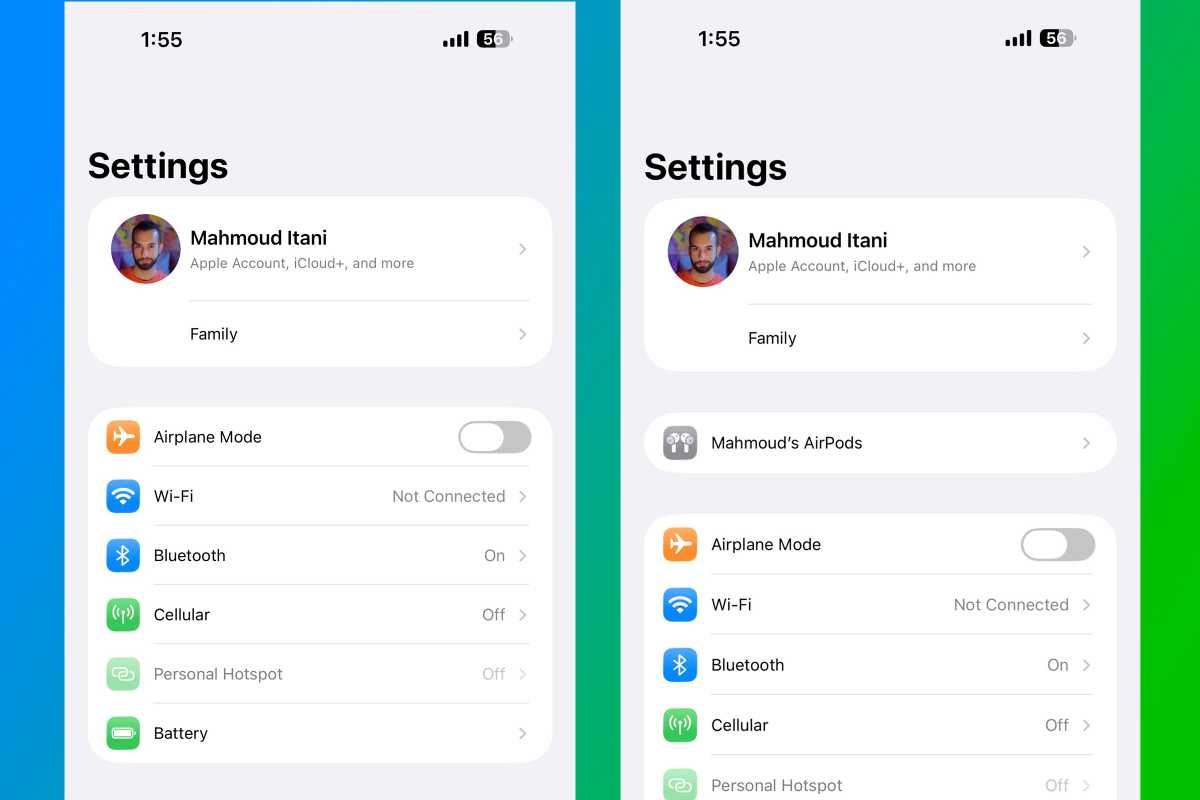
But recently, a curious anomaly emerged. On multiple occasions, this panel stubbornly remained visible in the Settings app *even after* the AirPods were securely nestled in their case. It lingered for several minutes, a clear departure from its usual behavior.
This persistence coincided directly with the release of new AirPods firmware from Apple. Immediately after the panel disappeared, a check of the AirPods’ settings confirmed the updated build number – the update had completed.
The panel’s presence signifies an active connection between your iPhone and AirPods, which makes perfect sense. AirPods rely on a connected iPhone to download the necessary firmware packages. Once the installation is finished, the connection normalizes, and the panel disappears.
Apple states that firmware updates happen automatically while your AirPods are charging and within Bluetooth range of a Wi-Fi connected device. You can’t force an update, but now you have a way to *know* when one is underway.
Keep an eye on your iPhone’s Settings app. That lingering AirPods panel isn’t a glitch – it’s a secret signal that your earbuds are receiving the latest improvements, working silently in the background.


