
A silent countdown is underway for millions of Windows 11 users. Microsoft has begun a critical, behind-the-scenes operation to replace expiring security certificates, a move essential to protecting your system from malicious software.
Secure Boot, a vital defense built into Windows, acts as a gatekeeper during startup. It verifies the digital signatures of software, ensuring only trusted code loads – a crucial barrier against deeply embedded threats. Without current certificates, this protection weakens, leaving your computer vulnerable.
The looming issue stems from a widespread expiration of Secure Boot certificates scheduled for June 2026. Microsoft issued a warning last year, urging administrators and users alike to prepare. The consequences of inaction are significant: potential inability to receive security updates and a compromised system susceptible to unauthorized boot loaders.

Devices manufactured before 2024 are most at risk. Newer PCs generally ship with the latest certificates already installed. However, the certificate expiration only impacts systems actively utilizing Secure Boot. If your PC isn’t booting with Secure Boot enabled, you won’t be affected.
You can quickly determine your Secure Boot status by pressing Win + R, typing “msinfo32,” and checking the “Secure Boot State” entry. A value of “On” confirms Secure Boot is active and requires attention.
To check the certificates currently on your system, open Windows PowerShell as an administrator and enter a specific command. A successful result will display current certificates, ideally including one with a 2023 timestamp like “MicrosoftUEFICertificateAuthority_2023.cer.”
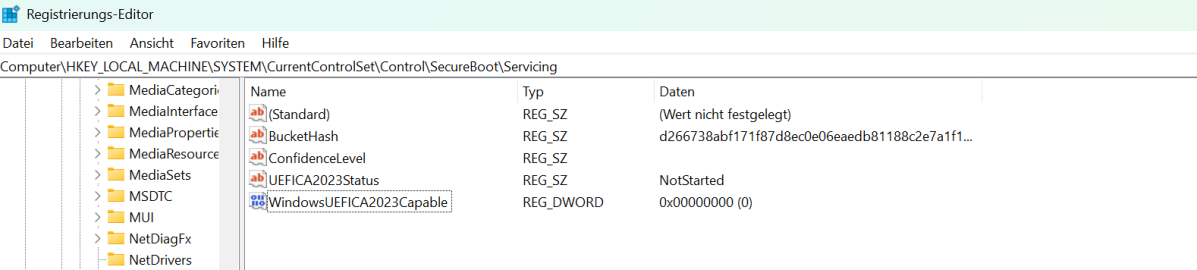
Older certificates signal a high probability of issues when the expiration hits. Fortunately, Microsoft intends to deliver the necessary updates through standard Windows quality updates. The rollout will be phased, relying on “successful update signals” to ensure a secure and gradual deployment.
Enabling diagnostic data reporting to Microsoft can also facilitate the update process. For larger organizations, alternative methods exist, including utilizing specific registry keys or the Windows Configuration System (WinCS) to manage certificate deployment.
This isn’t a distant threat; it’s a proactive measure to maintain the integrity of your system. By verifying your Secure Boot status and ensuring current certificates are installed, you’re reinforcing a critical layer of defense against evolving cyber threats.
The process is designed to be seamless, but awareness is key. Taking a few moments to check your system now can prevent potential headaches and security vulnerabilities down the road.


